Instagram Content Strategy for Creators
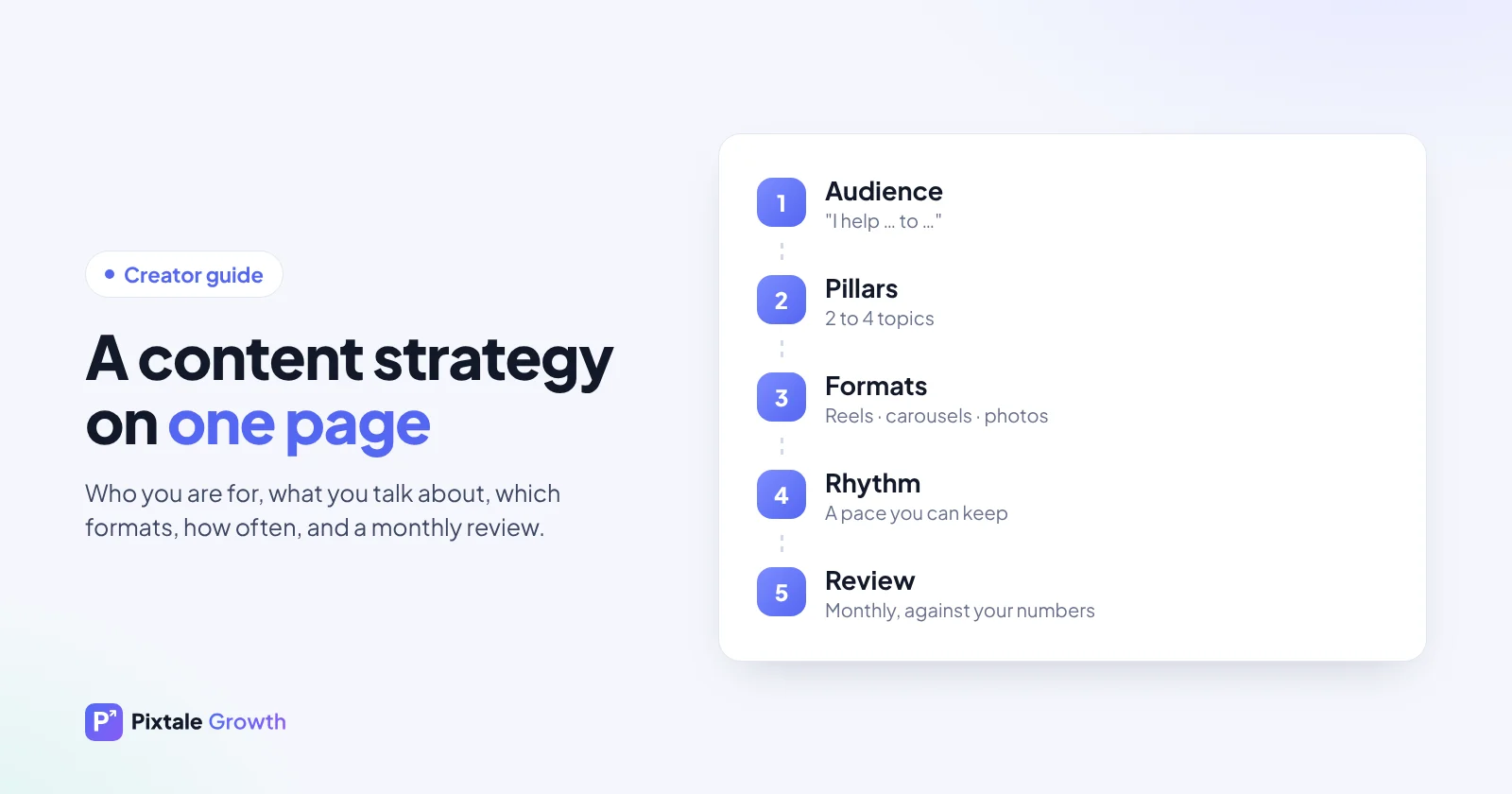
A content strategy doesn't need to be a long document. For most creators it is five decisions, written on one page and reviewed once a month against real numbers: who you are for, what you talk about, which formats you use, how often you post and how you learn from the results.
Why creators need a strategy at all
Without a plan, posting becomes a daily scramble for ideas, and the account drifts between topics. Followers can't tell what you are about, so fewer of them stay. A simple strategy fixes three things at once: it makes your account easy to understand, it makes ideas easier to find, and it lets you learn from your numbers because you are testing on purpose.
Step 1: Decide who you are for
Write one sentence that finishes "I help ... to ...". For example: "I help busy parents cook healthy weeknight dinners in 20 minutes" or "I help first-time investors in India understand mutual funds without jargon." The sentence is for you, not your bio, but it should guide every post. If an idea doesn't serve that person, it probably belongs on a different account or in stories.
Step 2: Pick two to four content pillars
Pillars are the recurring topics your account is known for. Fewer pillars make it easier for people to know why they should follow you. Some examples:
- Travel creator: budget tips, hidden places, packing and gear.
- Fitness coach: home workouts, simple meals, client progress (with consent), myths.
- Personal finance creator: money basics, product explainers, mistakes to avoid, news made simple.
- Food creator: quick recipes, restaurant finds, kitchen hacks.
A useful test: could you make 20 posts for each pillar without repeating yourself? If not, the pillar is too narrow. If any topic in the world would fit, it is too broad.
Step 3: Match each pillar to a format
Formats do different jobs, so pick the one that suits the idea:
- Reels are often shown to people who don't follow you yet, which makes them good for reach and new followers. Moments, transformations, quick tips and opinions work well.
- Carousels suit step-by-step tips, comparisons, checklists and stories. People save them to come back later.
- Single photos work for announcements, strong images, quotes and personal updates.
- Stories build the relationship with existing followers: polls, questions, behind the scenes and links.
Use your own numbers to decide which formats work best for each pillar. Reels vs photos shows how to compare formats fairly on your account.
Step 4: Set a rhythm you can keep
Three posts a week, every week, beats seven one week and none the next. Choose a rhythm you could keep during your busiest month, then pick the days and times using your best posting slots. A simple weekly template removes daily decisions:
| Day | Format | Pillar (example: food creator) |
|---|---|---|
| Monday | Reel | Quick recipe |
| Wednesday | Carousel | Kitchen hacks or a step-by-step |
| Friday | Reel | Restaurant find or opinion |
| Daily | Stories | Behind the scenes, polls, questions |
Step 5: Build an idea bank
Keep a running list of ideas in a notes app, sorted by pillar, so you never start from a blank page. Good sources:
- Your comments and DMs. Every question is a post idea, and the person asking is your audience.
- Your own best posts. A follow-up, a part two or the same topic from a new angle.
- Trending reels in your niche. See what is getting views in your topic right now with Reel Research, or follow this guide to finding trending reels.
- Searches and FAQs. What do beginners in your niche ask? Each question can become a carousel.
- Your own life. Mistakes, lessons and things you changed your mind about.
Step 6: Write hooks and captions that invite a reply
The first second of a reel and the first line of a caption decide whether anyone sees the rest. Lead with the result, the surprise or the question. Our list of 40 reel hooks has opening lines sorted by type.
In the caption, put the most interesting line first, because it is all most people read. Add the detail in short lines. End with a specific question ("Which of these would you try first?") rather than a generic "thoughts?". Use a handful of relevant hashtags rather than thirty generic ones; hashtags for reels explains how to choose them.
Step 7: Batch your production
Creating one post at a time, every day, is exhausting. Many creators batch instead:
- Plan next week's posts in one sitting from the idea bank.
- Shoot several reels in one session, with outfit or setting changes if needed.
- Edit and write captions in another session.
- Schedule them, then spend daily time on comments, stories and replies.
Batching leaves room for timely posts too: when something happens in your niche, you can react without falling behind on your planned posts.
Step 8: Review once a month
At the start of each month, look back at the previous one:
- Rank your posts by engagement and compare the top three with the bottom three.
- Check each pillar: which one drives the most engagement, and which one brings new followers?
- Check each format the same way.
- Read your comments for repeated questions.
- Change one thing for next month and write it down.
Keep short notes so that, after a few months, you can see which changes actually helped. Finding your best-performing posts explains how to rank posts fairly.
Example: a four-week plan for a new pillar
An illustration of how a creator might test a new pillar without abandoning what works:
- Week 1: one reel and one carousel on the new pillar, alongside the usual posts.
- Week 2: repeat with a different angle; ask followers in stories what they want to know.
- Week 3: answer the best question from stories in a carousel.
- Week 4: compare the new pillar's posts with your account average. Keep it, adjust it or drop it.
Common strategy mistakes
- Copying a big creator's plan. What works for an account with a million followers may not work for one with two thousand.
- Changing everything at once. You won't know which change helped.
- Too many pillars. New visitors can't tell what the account is about.
- Posting only for reach. Viral reels bring followers, but carousels and stories keep them.
- Never reviewing. A plan that is never checked against numbers is just a calendar.
Let AI do the review
Pixtale Growth reads your recent public posts and shows your engagement, top posts and how you compare with similar accounts. On Individual and Enterprise, the AI explains what is working and suggests what to post next, and Enterprise adds 7 and 30-day growth plans. Start with a free profile check.
FAQ
How many hashtags should I use?
A few focused, relevant hashtags tend to work better than many generic ones. Test on your own account and keep what helps.
How many content pillars should a creator have?
Two to four is enough for most creators. Fewer pillars make it easier for new visitors to understand what the account is about.
How often should creators post on Instagram?
Choose a rhythm you can keep every week, even in a busy month. Three posts a week, every week, usually beats bursts of daily posting followed by long gaps.
Should I post more reels or carousels?
Reels often bring more reach from non-followers, while carousels often earn saves and comments from existing followers. Compare both on your own account before deciding.
How do I know if my content strategy is working?
Review monthly: engagement rate, follower growth, your top and bottom posts and repeated questions in comments. If a change improves these over several weeks, keep it.
Check any Instagram account free
AI rating, niche, engagement rate and top posts for any public profile. No login.
Analyse an account