

Instagram audit report for any account
Check one Instagram account in full: engagement, audience quality, best time to post, every post and why it worked, plus a PDF you can keep or send. Pay $5 once.
Free preview first. Unlock the full report only if you want it. Public accounts only, no Instagram login.
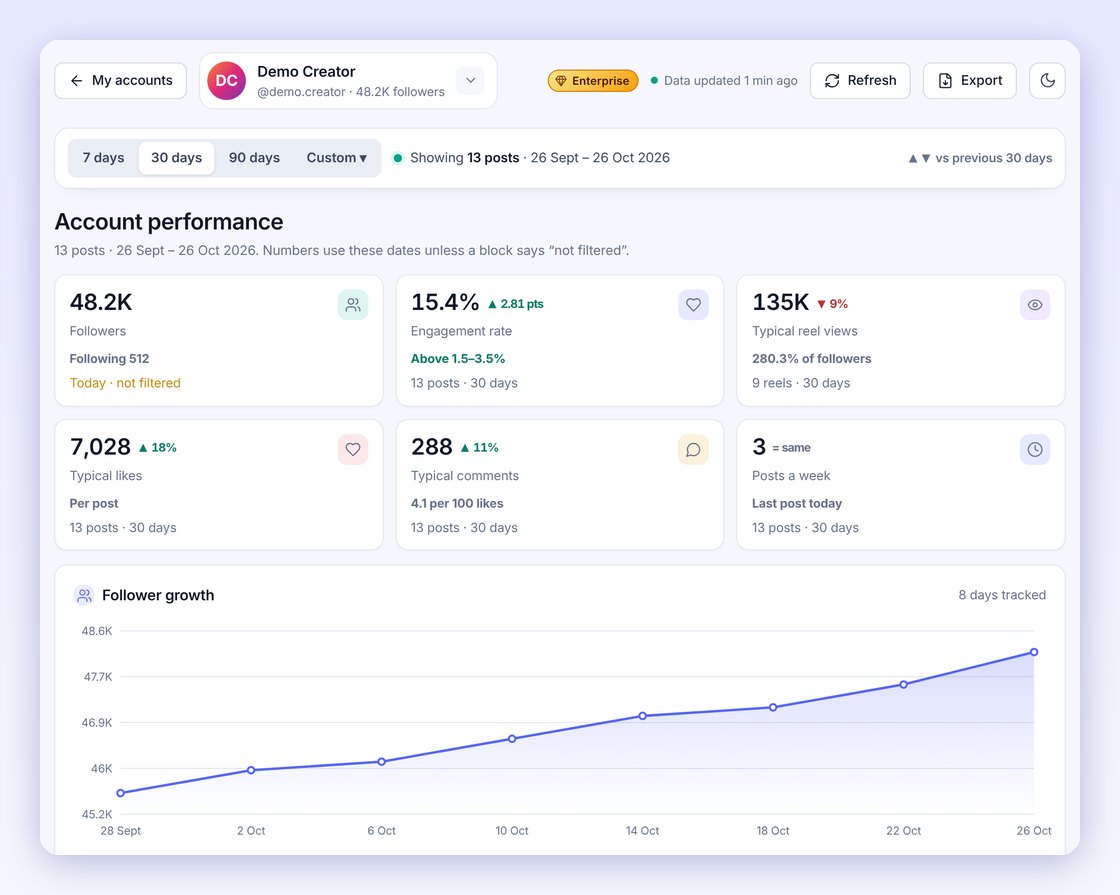
What's in the audit report
Engagement, compared fairly
Engagement rate, typical likes, comments and reel views, compared with accounts of the same size so you know if a number is good.
Audience quality
A score out of 100, estimated real followers and the warning signs checked, before you trust an influencer or a growth claim.
What worked and why
Every post from the last 90 days ranked, with the reasons the best and weakest ones performed the way they did.
Best time to post and hashtags
The day and time this audience reacts most, which hashtags and mentions show up on the strongest posts, and reels vs photos.
AI overview and quick wins
An AI overview at the top of the report: where the account stands, the biggest problem, what changed since the last check and the next change most likely to help.
Problems to fix, marked Fixed or Not fixed
Every problem found in the account's own numbers, with what it costs each post and how to fix it. Check again later and each one shows Fixed or Not fixed.
PDF download
Download the report as a PDF to keep, share with a client or attach to a pitch.
Track which Instagram problems you fixed
Most Instagram audits stop at a list of problems. Pixtale keeps the result of every check, so the next report compares the account with the check before it and marks each warning:
Not fixed
The problem is still there, with the date it was first found. For example, engagement below the normal range for accounts this size, or no new post for 14 days.
New
A problem that wasn't there at the last check, such as reel views falling after a change of format or posting time.
Fixed
A problem from the last check that the numbers no longer show, such as a posting gap that is closed or more people commenting.
Problems are checked across engagement rate, reel views, posting rhythm, comments, fake or inactive followers, reliance on one viral post and the reels vs photos mix. Nothing is guessed: a problem is only listed when the account's own posts show it.
The AI overview at the top
AI-powered analysis, built for you. Not a generic checklist: a read of your own posts, your own audience and the one change that will move your account next. The report opens with a short AI overview, so you know what matters before you read the details: the account's rating, how its engagement compares with similar-sized accounts, the biggest problem, how many problems are fixed or still open since the last check, and the one next step to take. The full report adds the AI's own written summary of the account from its posts and captions.
How it works
- Enter the username
Type any public Instagram account and see the free preview: AI rating, engagement rate and top posts.
- Unlock the full report
Pay $5 once by card (UPI too in India). No autopay.
- Read it and download the PDF
Every section opens for that account for 7 days on your Pixtale account. The AI overview and the Fixed / Not fixed list are in the PDF too.
Who it's for
Brands checking an influencer
See real engagement and audience quality before you pay for a collaboration.
Creators
Get an honest audit of your own account: what is working, what isn't, and when to post.
Agencies and freelancers
Audit a prospect before a pitch and send the PDF. For many clients a month, see Pixtale for agencies.
Small businesses
Check a competitor's account and see which of their posts actually bring engagement.
Free check, one report or a plan?
| Free | One report | Individual / Enterprise | |
|---|---|---|---|
| Price | $0 | $5 once | Monthly or yearly plan |
| Accounts | 1 a day, preview | 1 account, full report | Many accounts every day |
| AI analysis, audience quality, best time | Rating only | Yes | Yes |
| Posts | Top 3 | Last 90 days | 30 days (Enterprise: 90 days and custom) |
| PDF download | No | Yes | Yes (Enterprise: your logo) |
| Subscription | None | None | Yes, cancel anytime |
Questions
What is an Instagram audit report?
A full check of one Instagram account: engagement rate compared with similar-sized accounts, audience quality and estimated real followers, which posts and reels worked and why, the best day and time to post, hashtags, an AI overview with quick wins, and every problem marked Fixed or Not fixed against the last check. You can download it as a PDF.
How much does it cost?
One small payment, shown in your own currency before you pay. There is no subscription and no autopay, so there is nothing to cancel.
Which account can I audit?
Any public Instagram account: your own, a competitor, or an influencer you are thinking of paying. Private accounts can't be checked.
Do I need to log in with Instagram?
No. Pixtale reads public data only. You never share an Instagram password.
How long can I open the report?
7 days from payment, on your Pixtale account. You can reopen it and download the PDF as often as you like in that time.
What is not included?
The report and its PDF are included. Comment reading, CSV export and share links are part of Individual; competitor comparison and custom dates are part of Enterprise. If you need reports for many accounts every month, a plan works out cheaper.
How do I know if I fixed a problem?
Check the account again after you make changes, ideally a week later. The report compares the new numbers with the last check and marks each problem Fixed, Not fixed or New. The first check of an account marks every problem Not fixed.
What is the AI overview?
A short summary at the top of the report: where the account stands, the biggest problem, what changed since the last check and the next step. It is built from the account's real numbers, and the full report adds the AI's written summary of the posts and captions.
Is the free check different?
The free check shows the AI rating, engagement rate and top 3 posts. The one-time report opens every section for that account, 90 days of posts and the PDF.